
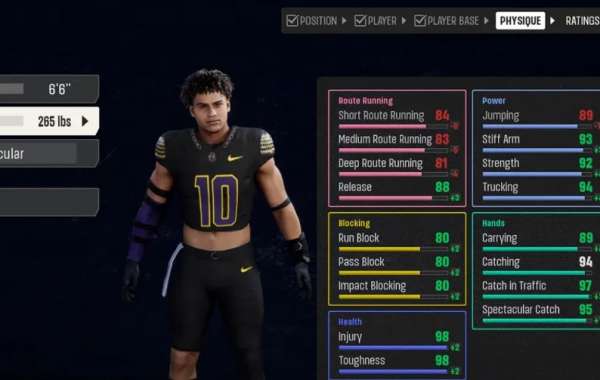
If you have booted up EA Sports College Football 27 looking for the traditional, old-school "Create-A-Player" menu right on the main hub, you have probably spent a frustrating ten minutes digging through submenus only to find nothing. You aren't losing your mind—it genuinely isn't there.
Because of real-life player licensing rules and Name, Image, and Likeness (NIL) restrictions, EA Sports had to ditch the straightforward main-menu player creator. They cannot risk players accidentally or intentionally bypassing licensing boundaries on standard rosters. However, that does not mean you are completely locked out of taking a customized superstar to the gridiron. You just need to know where to look. Depending on how you want to play, there are three distinct paths to building your own athlete from scratch.
Method 1: The Road to Glory Route (Single Player Career)
If your ultimate goal is to guide a single custom player through a dramatic college career, win the Heisman, and potentially declare for the draft, then Road to Glory is your best bet. This is the cleanest, most official in-game tool available.
Fire up the main menu and head straight into Road to Glory mode.
From here, you can choose to build your custom athlete completely from scratch, or select a "Legend Template" based on former college icons like Michael Vick or Cam Newton to give yourself a tailored head start.
Next, pick your position and select your journey's background storyline. You can enter the league as a highly touted Elite Blue Chip prospect, an established Contributor, or fight from the bottom as a gritty Underdog.
Dive into the attributes and identity suite. This is where you lock in your name, hometown, throwing/carrying handiness, and specific archetype to dictate how you play on the field.
Finally, hit the gear customization screen. Thanks to some highly requested community upgrades in this year's edition, the apparel options are incredible. You can equip hanging mouthpieces, reflective visors, single leg sleeves, rolled jersey variations, and even school-specific custom backplates like Notre Dame's iconic "Play Like a Champion" logo.
Method 2: The Team Builder Website (For Custom Rosters & Teams)
Maybe you don't want to play a single-player career. Maybe you want to create an entire roster of custom athletes, or inject a handful of created players into an offline Dynasty mode. For this, you have to leave the console behind for a moment and jump onto a web browser.
Open your computer or phone and head over to the official EA Sports College Football Team Builder website, then log in using your standard EA Account.
Once inside the creation dashboard, click over to the Program and Roster tabs.
Click directly on any individual player slot on the roster grid. This opens up a deep customization menu where you can fully build an athlete from the ground up. You can modify their name, height, weight, college year, skill ratings, special abilities, and even their transfer dealbreakers.
Once you are happy with your roster and team design, save your progress online. Boot up your game console or PC, navigate to Create and Share, and download your custom school. From there, you can import them straight into a new Dynasty Mode save.
Method 3: The Dynasty Mode Roster Workaround
What if you just want to put yourself or a fictional superstar onto an existing, real-world team inside Dynasty Mode without dealing with external websites or playing through Road to Glory? This is where the community's favorite "makeshift" workaround comes into play. While you cannot create a player out of thin air on a real team, you can modify existing computer-generated recruits.
Start your Dynasty Mode save, or navigate to Create and Share > Rosters > Manage Players from the game's main menu.
Scroll over to your team of choice and look closely at the roster. You want to find a generic, fictional freshman or a non-NIL computer-generated recruit. Keep in mind that real-life college players who opted into the game are strictly locked down and cannot be edited.
Click on your chosen generic player, open their player card, and hit Edit Player.
Swap out that random computer-generated name for your own custom name, and change their jersey number to whatever you prefer.
Head over to the Ratings tab and max out their attributes to match whatever skill level you want your custom player to have.
Under the Appearance and Apparel tabs, you can fine-tune their height, weight, body build type (such as Muscular, Standard, or Lean), and completely overhaul their equipment.
A Quick Heads-Up: While the Dynasty workaround lets you change names, gear, and attributes, the game's underlying facial structural models for these generic players cannot be swapped out. You will have to look through the generic roster to find a base face model that closest resembles what you are aiming for before you start editing!